
Intro
In college, I worked as webdev admin for 2 years. We run a LAMP-stack website that serves as the backbone of a freshman course. Without it, students can't submit assignments, professors can’t upload grades, and teaching assistants (TAs) can’t file work reports. As webdev admins, there’s a thrill in bug-fixing, especially that moment when you push your commits to the cloud and pull it live.
Throughout this time, I learnt to work with SQL databases, write SQL scripts saving hours of work, and wrangle with a PHP codebase which I had no experience with before. But most crucially, I learnt how to think through a problem when they arise. Here, I want to extract the lessons I’ve learnt, serving as a useful reminder for future me and anyone who might find it useful.
It was pretty intimidating at the start. There was a time pressure to get it working, and then there’s learning a whole new language in parallel. One of the biggest problems I had was not knowing where to look. Like, where do I even start?
Principle 1: Reproduce the issue, then isolate variables
One of the most important principles I’ve learnt is reproducing the issue and isolating the variables. Reproducing the issue means trying the same steps to see if you observe the same faulty behaviour. If you do, you’ve likely eliminated user/device-specific causes. Isolating the variables means that now, you’re brainstorming various possible causes, testing each one methodically. The goal is to shrink the space of potential causes. Here’s how I visualize it:
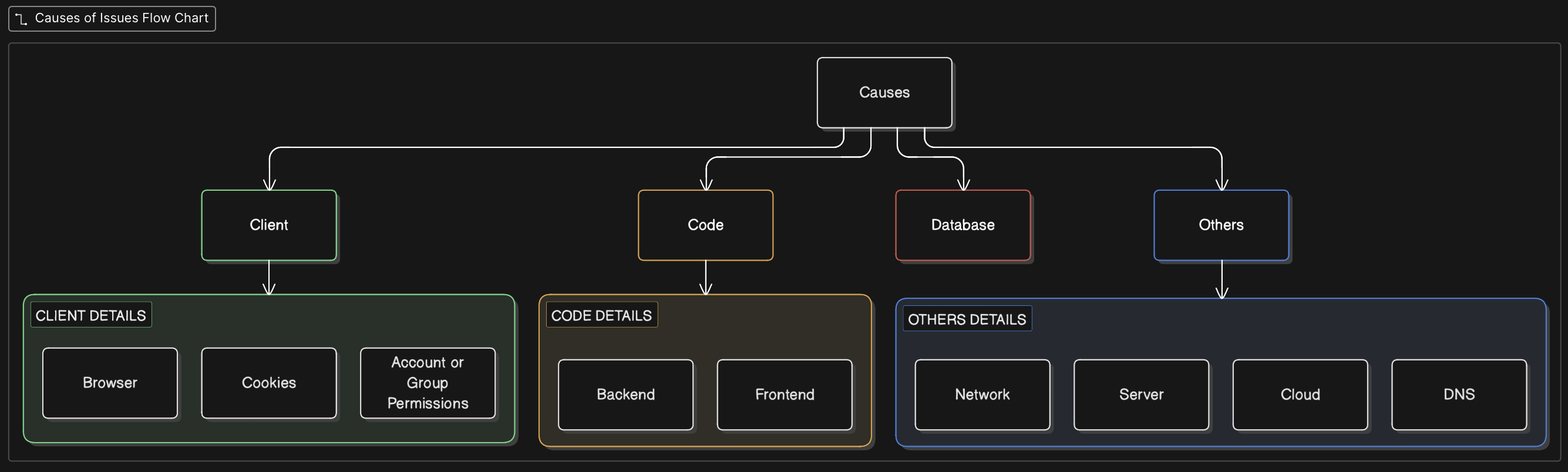
One memorable example stuck with me because of how micro the cause turned out to be (small things can do large damage). One day, a TA said they couldn’t mark students as “Trained” for soldering on the website. After selecting the student and clicking the “Mark as Trained” button, the page refreshes, but the student still shows as “Untrained” on the frontend.
Here’s how I stepped through the problem.
First, I tried to reproduce the TA’s problem. Using my fake student account I set up previously. I try marking my fake student as trained. Refreshing the page, I still see “Untrained”, which indicates this is not a user-specific problem.
Next, I moved onto isolating variables. First, network request - did clicking submit actually send a network request to the backend? Yes. How do I know? I checked the Network Tab to see that a request was sent and HTTP 200 OK was returned to me. Second, backend/database - did the backend actually manage to update the database to mark the student as trained? Yes, because my fake student had the value True in the ‘trained’ column.
If the database had the correct data, but the frontend still displays ‘Untrained’, that leaves a code issue, specifically the logic of how the frontend decides to display Trained or Untrained. Heading into that file, it didn’t take long to see that the PHP was first fetching the boolean from the database, but later using === to see if it is equal to ‘true’, a string. The subtlety is that ===, the strict comparison operator, only evaluates to true if both the value and data types match. Since a boolean is clearly not a string, students marked true on the database remain “Untrained” on the frontend. I simply changed the comparison to loose comparison (==) to get it working properly. It would’ve taken me way longer had I just dived into the code trying to figure out what was going on.
Every step on the way helped me eliminate a potential failure, until I was left with just one.
Principle 2: Gather evidence
Reproducing the issue and isolating variables requires evidence, which brings me to the second principle: gathering evidence. At first, I only looked at DevTools. The Network Tab is useful for knowing if a network request was actually sent when I press the Submit button. The error codes like 500 tells me that something went wrong on the server. Later on, I also learnt that we could look at logs, which let me cut straight through the problem.
Here’s how I once used logs to my advantage. A TA was trying to submit a project form for a specific student group. The form submission just didn’t work, and they sent in a screenshot with the server error code 500. I first told them to hard-refresh on their browser, try another computer, and try using another TA’s account. Everything failed. So it was probably something wrong with the code or database.
Based on their timestamp, I went onto the vm platform and headed into Logs Explorer. From there, I saw some PDO Exceptions, and filtered for relevant PHP page. Immediately, I saw a SQLSTATE[42S22] column not found error. The error message came with an exact line number so I could head straight there. This request was trying to insert data into a column which does not exist in the database table. So, I went ahead to create the necessary columns on the database, retried, and it worked gloriously. Logs really are the ultimate time-savers when it comes to troubleshooting.
Reflections
To me, troubleshooting is applying the scientific method instead of counting on guesswork and instincts. Identifying assumptions can be tricky, but saves us a lot of time down the road too.