
Intro
What sucked?
As part of webdev, I was on the team that ran a LAMP-stack website to handle all the course operations of a college course. Everything from submitting assignments to grading and work reports happened on this website.
One workflow was especially troublesome: need replacements (NRs). When TAs can’t make their shift, they need to ask for replacement. The traditional workflow goes like this: submit a request on the website, Slack admins for approval, send message in Slack channel to encourage pickups. Head admins have to read Slack, go back onto the website to click approve.
3 problems arise:
- Inefficient since users are bouncing between 2 platforms
- Many TAs forget to send a message in the channel, leading to an abundance of unreplaced shifts
- Adds to email junk which no one reads
So, I decided to code a bot that streamlines need-replacements onto Slack.
Tech ingredients
- PHP backend: adding to and creating API endpoints
- Slack Events API: reaction-triggered workflows
- #need_replacements Slack channel, aka where the bot lives and the action happens
How does it work?
Beside the initial NR request submission, everything will take place on Slack channel #need_replacements. The idea is that emoji reactions on Slack will trigger POST requests to PHP endpoints. The backend will parse them and update the database accordingly.
A. Create a new need-replacement request
What happens:
- A TA submits a Need Replacement (NR) request on the website
- The bot posts an automated message in the #need_replacements Slack channel
- The message includes the replacementID, which lets Slack actions map back to database records
When a new TA submits a need-replacement request, a Slack message gets sent into the channel.
if (isset($_POST['creationFormSubmit'])) {
// ...insert new request into SQL database
sendSlackNotification($userFullName, $workTypeName, $_POST['inputDate'], $_POST['timein'], $_POST['timeout'], $comment, $experimentLabInfo, $recitationInfo, $replacementID, $sickleave);
// ...remove sendEmail function
}
I wrote a function called sendSlackNotification, which is responsible for packing all the info into a string, converting it into JSON, and using cURL to send the payload to the webhook URL of our Slack workspace:
function sendSlackNotification($userFullName, $workTypeName, $inputDate, $timein, $timeout, $comment, $experimentLabInfo, $recitationInfo, $replacementID, $sickLeave) {
  $webhookUrl = '...'; // webhook for Slack workspace

  // format the bot message for need-replacement details
	$formattedTimeIn = date("g:i A", strtotime($_POST['timein']));
	$formattedTimeOut = date("g:i A", strtotime($_POST['timeout']));
	$text = "\n";
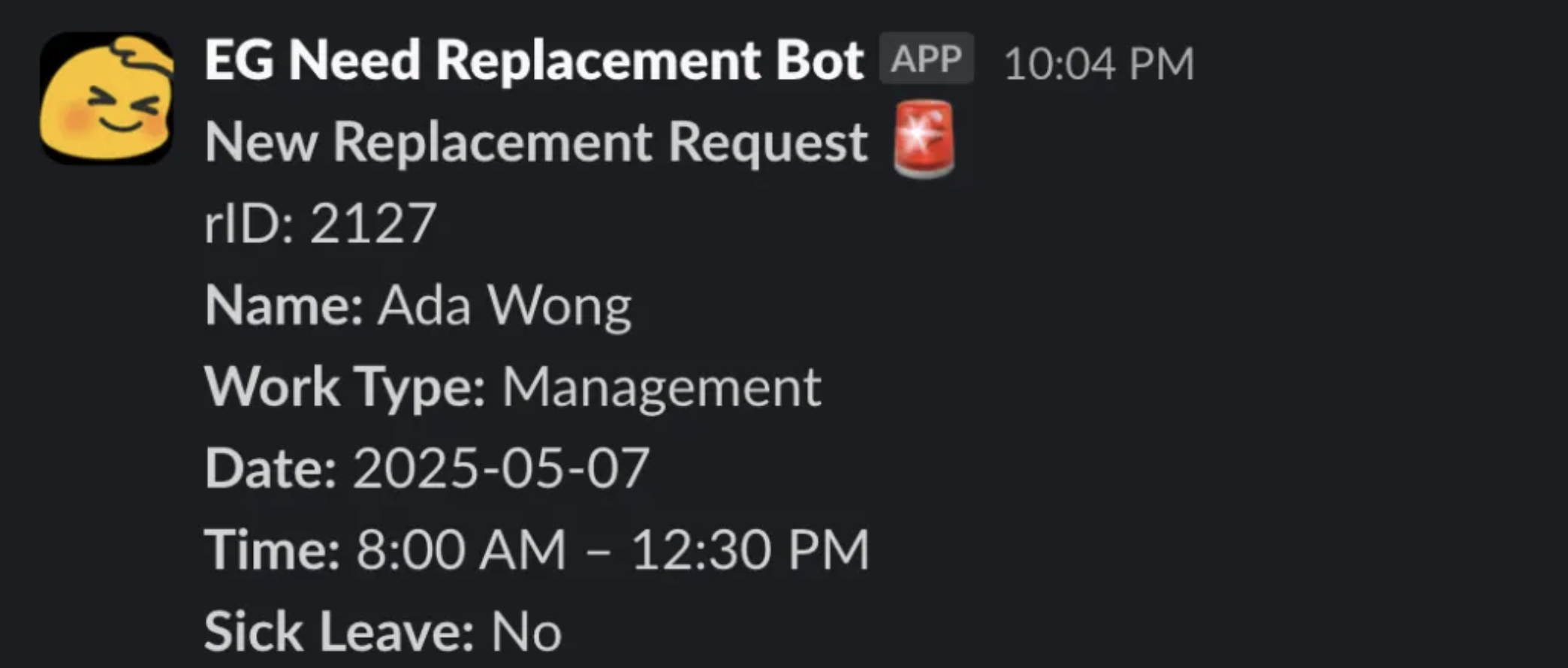
	$text .= "*New Replacement Request* :rotating_light:\n";
	$text .= "rID: $replacementID\n";
	$text .= "*Name:* $userFullName\n";
	$text .= "*Work Type:* $workTypeName\n";
	if (!is_null($experimentLabInfo)) $text .= "*Lab Number:* $experimentLabInfo\n";
	if (!is_null($recitationInfo)) $text .= "*Recitation Number:* $recitationInfo\n";
	$text .= "*Date:* $inputDate\n";
	$text .= "*Time:* $formattedTimeIn – $formattedTimeOut\n";
	$sickLeaveText = $sickLeave == 1 ? 'Yes' : 'No';
	$text .= "*Sick Leave:* $sickLeaveText\n";
	$text .= "\n";

  $payload = json_encode(["text" => $text]);

	// send msg using curl
  $ch = curl_init($webhookUrl);
  curl_setopt($ch, CURLOPT_POST, true);
  curl_setopt($ch, CURLOPT_POSTFIELDS, $payload);
  curl_setopt($ch, CURLOPT_HTTPHEADER, ['Content-Type: application/json']);
  curl_setopt($ch, CURLOPT_RETURNTRANSFER, true);
  curl_exec($ch);
  curl_close($ch);
}
A new message appears in the #need_replacements Slack channel after cURL executes. This is what it looks like:
B. Admin approve/deny request via emojis
Admins can manage requests directly from Slack:
- ✅ - Approve request - Updates request status to OPEN
- ❌ - Deny request - Delete request from database
- Remove ✅ - Revoke approval - Set status back to WAITING
When the backend first receives the webhook msg from Slack, it does some pre-processing and checks that it’s legitimate using secrets. I’ll get into in the security section.
Here’s what I wrote for approving NR requests:
// replacement_slack_endpoint.php

// ✅ emoji: Admin APPROVES NR request
    if ($reaction === 'white_check_mark') {
        // fetch msg
        $url = "https://slack.com/api/conversations.history?channel=$channel&latest=$message_ts&inclusive=true&limit=1";
        $headers = ["Authorization: Bearer $slack_token"];

        $ch = curl_init($url);
        curl_setopt($ch, CURLOPT_HTTPHEADER, $headers);
        curl_setopt($ch, CURLOPT_RETURNTRANSFER, true);
        $response = curl_exec($ch);
        curl_close($ch);

        $result = json_decode($response, true);
        $message = '';

        // check for text
        if (!empty($result['messages'][0]['text'])) {
            $message = $result['messages'][0]['text'];
        }
        // fallback if text is not present
        elseif (!empty($result['messages'][0]['blocks'])) {
            foreach ($result['messages'][0]['blocks'] as $block) {
                if (isset($block['text']['text'])) {
                    $message .= $block['text']['text'] . "\n";
                }
            }
        }

        // extract the Replacement ID from the message
        if (preg_match('/\*rID:\*\s*(\d+)/', $message, $matches)) {
            // $matches is an array that contains the full text and just the captured part
            $replacementID = $matches[1];   // just the captured part (actual rID number)

            // exit if this request does not exist (e.g. deleted previously)
            $row = returnRequestDetails($replacementID);
            if (!$row) {
                $errorMsg = "*Error:* Request #$replacementID does not exist!";
                replyToSlack($channel, $message_ts, $errorMsg);
                exit;
            }
            // send the approval request to replacement.php backend (cURL)
            $postData = http_build_query([
                'replacementID' => $replacementID,
                'admin_approve' => 'Verify and Approve',
                'from_slack' => $slack_origin_custom_secret
            ]);

            $ch = curl_init($actual_endpoint);
            curl_setopt($ch, CURLOPT_POST, true);
            curl_setopt($ch, CURLOPT_POSTFIELDS, $postData);
            curl_setopt($ch, CURLOPT_RETURNTRANSFER, true);
            $result = curl_exec($ch);
            curl_close($ch);

            $userEmail = getSlackUserEmail($userID, $slack_token);
            $responseData = json_decode($result, true);
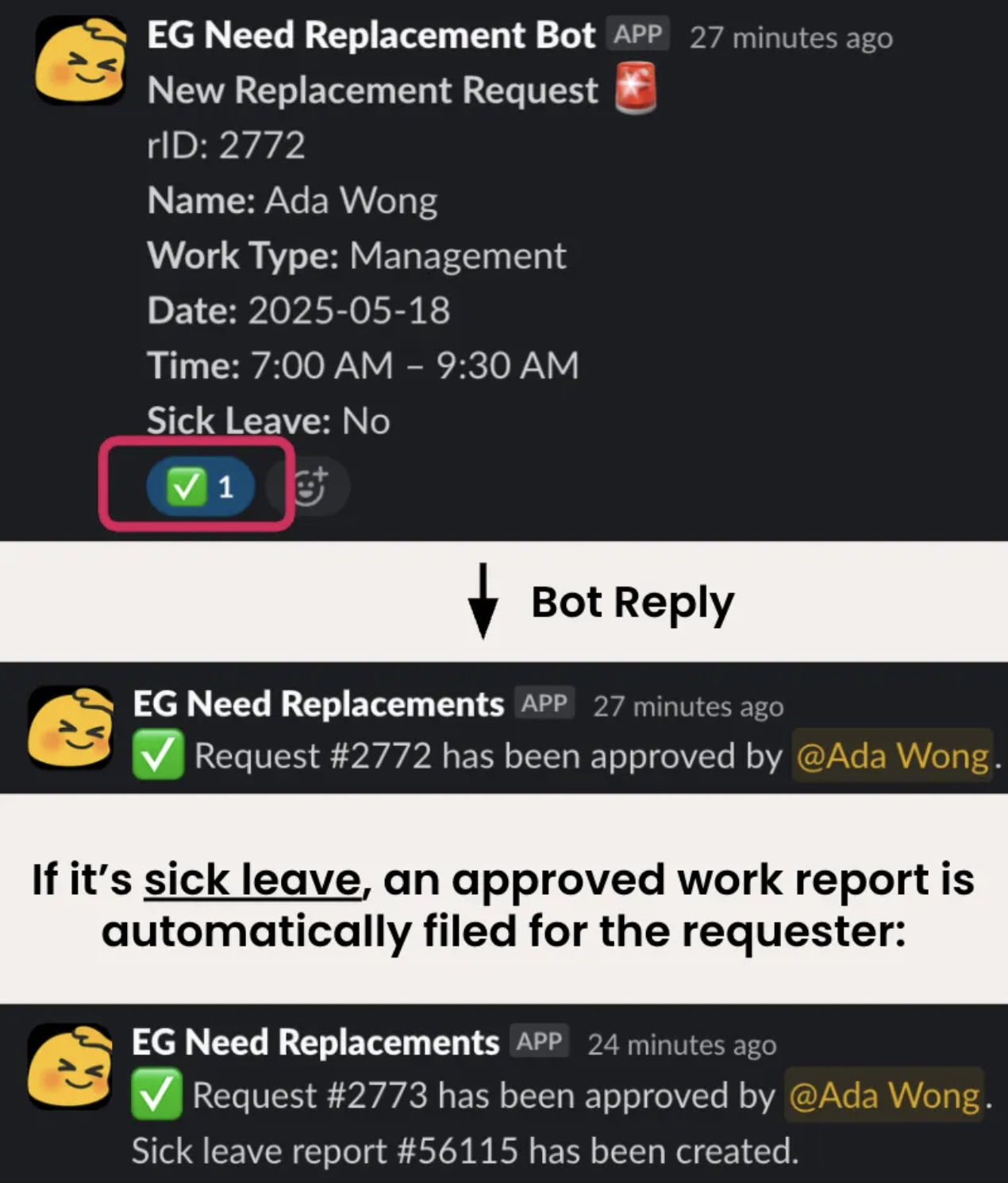
            $message = "✅ Request #$replacementID has been approved by <@$userID>.";

            // if this was a sick leave request, include the reportID in the message
            if (isset($responseData['reportID'])) {
                $message .= "\nSick leave report #" . $responseData['reportID'] . " has been created.";
            }
            replyToSlack($channel, $message_ts, $message);
        } else {    // no valid replacementID
            replyToSlack($channel, $message_ts, "⚠️ Sorry <@$userID>, couldn't find a valid Replacement ID in the message.");
        }
    }
And here’s how it looks in action:
C. Volunteers pick up shifts
When other TAs see a shift they want to volunteer, they can react 👀 to the message. The bot then posts a thread reply tagging them:
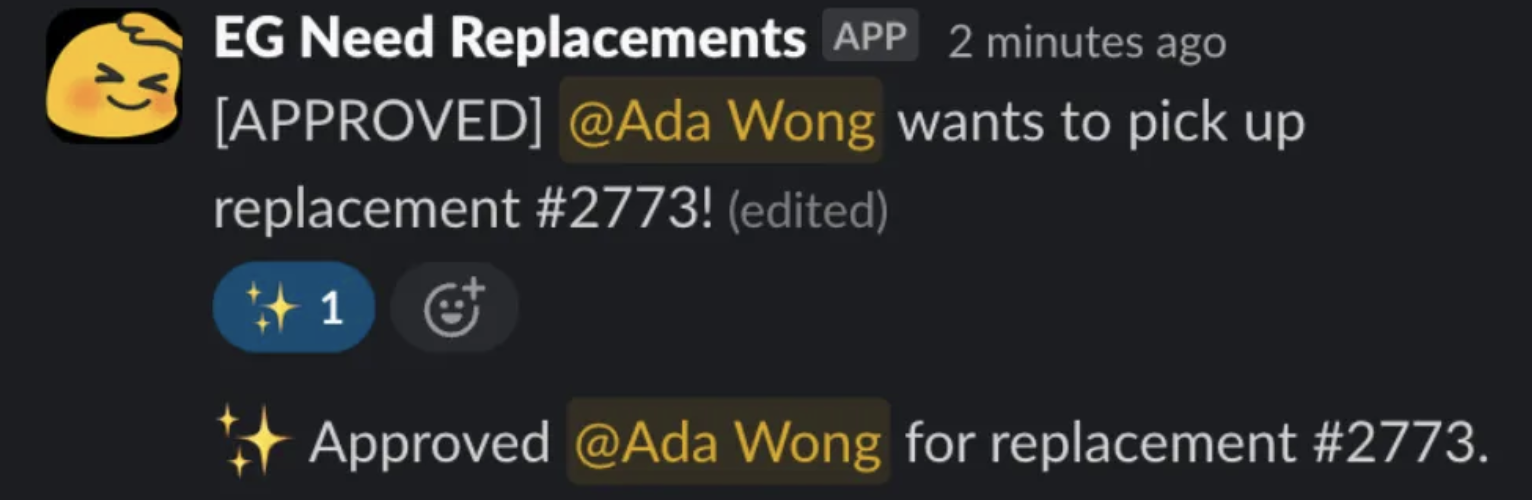
Doing this, the backend will:
- Extract volunteer’s Slack user ID
- Fetch their email and map to internal user ID
- Insert into database a new entry for this volunteer request
- Sets volunteer request status to APPROVED on database
- Set replacement request status to CLOSED on database
A new bot reply will say that this person has been approved. The volunteer’s bot message will also be edited to indicate that it’s been APPROVED.
If the admin wants to revoke approval for this volunteer, they can unreact ✨:
- Volunteer status → PENDING
- Request status → OPEN
- Slack message label [APPROVED] removed
Making sure it’s safe!
How do we know the msg is from Slack?
// replacement_slack_endpoint.php
$slack_origin_custom_secret = '...'; // used in access file's loggedIn() func
I used a custom secret variable, which is just a very long alphanumerical string. When someone reacts an emoji and Slack sends a request to our PHP backend, Slack will include a POST parameter called ‘from_slack’ containing this secret. If the value in the request matches its true value, the function checking if the session is logged in will return true. Essentially, the backend is saying: “ok, I see that you’re from Slack and I’ll let you in”. Without it, none of the database actions can happen either.
How do we know no one tampered with the Slack request?
$slack_signing_secret = '...'; // find in Slack App Bot Settings
This signing secret is taken from our Slack Bot’s settings. We can think of it as a private key.
Here’s how it works:
-
Slack sends a payload, including a timestamp and hash value
- The hash value comes from hashing the payload using SHA256 algorithm and $slack_signing_secret as key
-
PHP backend receives
-
PHP backend will take the payload, hash it using the same algorithm and secret
$base_string = "v0:$timestamp:$body"; $calculated_signature = 'v0=' . hash_hmac('sha256', $base_string, $slack_signing_secret); -
PHP backend checks if the hashed result matches the hash value in the request. If they don’t match, this request is treated as illegimate:
// verify the signature
if (!hash_equals($calculated_signature, $slack_signature)) {
    http_response_code(401);
    echo "Invalid Slack signature.";
    exit;
}
Imagine someone was snooping the request and tried to change its content. That alone will change the hash value, which the backend will clock. They can’t rehash the tampered payload and change the hash value either, because they don’t have access to the $slack_signing_secret.
Replay attacks are also prevented too:
// reject if too old (to prevent replay attacks)
if (abs(time() - $timestamp) > 60 * 5) {
    http_response_code(400);
    echo "Request too old.";
    exit;
}
How do we limit admin actions to admins?
I used an allowlist of emails to verify admin permissions. Anybody who’s not an admin gets blocked if they try to use admin emojis:
// replacement_slack_endpoint.php
replyToSlack($channel, $message_ts, "⛔ Sorry <@$userID>, you are not authorized for this action.");
For better security and easier maintenance, I would change from a hard-coded allowlist to querying admins from the database’s users table.
Problems I ran into
This project was good practice in troubleshooting, as I probably spent just 40% building, and the rest of the 60% fixing problems and getting it to work smoothly.
A. Database bugs
Problem: New NR request is submitted, slack message is sent into the channel, with replacement ID as NULL
Troubleshoot:
- Realised the replacement request may not have been successfully inserted into the database > check database > entry does not exist!
- Added check for success after database insertion line for diagnosis
- Received value errors in the array:
- Checked that the number of variables matches the number of question mark placeholders in the prepared SQL statement > Yes
- Realised that it is the sick leave variable that’s causing trouble
- I was providing a different data type than what the database wanted
Fix:
- Change sick leave to 1 / 0 (integer) instead of true / false (boolean) when inserting replacement entry into the database
B. Message parsing bugs
After getting the initial Slack bot message to display the replacement ID, subsequent emoji workflows were failing. The backend just couldn’t extract the replacement ID from the payload. Turns out it was because I forgot to match for the asterisks in my regex:
preg_match('/\*rID:\*\s*(\d+)/',$message,$matches) // updated to match for *rID:* instead of just rID:
C. Slack API failures
When I started working on the approving volunteer part, the backend just could not find the corresponding volunteer reply message. Turns out I was using the wrong Slack API method. Instead of using the conversations.history method, I needed to use conversations.replies. Alas some issues can only be solved efficiently by reading the documentation ourselves.
There were a bunch more issues with Slack config:
- Missing event subscription (reaction_removed)
- Missing scopes (groups:history, users:read.email)
- Bot not in Slack channel → /invite @bot
Conclusion
Over the course of 1 month, I had loads of fun building the bot. After showing the demo, doing some tweaking and finally shipping, I was so happy to see it up and running. People like how need-replacements are centralised on a single Slack channel, and admins find it easier to track replacements and volunteers too. I learnt how to use Slack API, and I learnt about writing secure API endpoints through hashing and signatures. Overall, it was a very gratifying project to build, especially after solving every single issue that sprang up (inevitably) during development.